> ## Documentation Index
> Fetch the complete documentation index at: https://docs.0xkey.io/llms.txt
> Use this file to discover all available pages before exploring further.
# Embedded Consumer Wallet
> 0xkey provides wallet infrastructure with flexible authentication, programmable transaction flows, and granular access controls, while keys remain in hardware-backed enclaves. Start with the Embedded Wallet Kit and drop down to low-level primitives when you need to customize.
**Why 0xkey for Embedded Consumer Wallets**\
0xkey delivers a secure, flexible solution for embedding end-user wallets directly into your
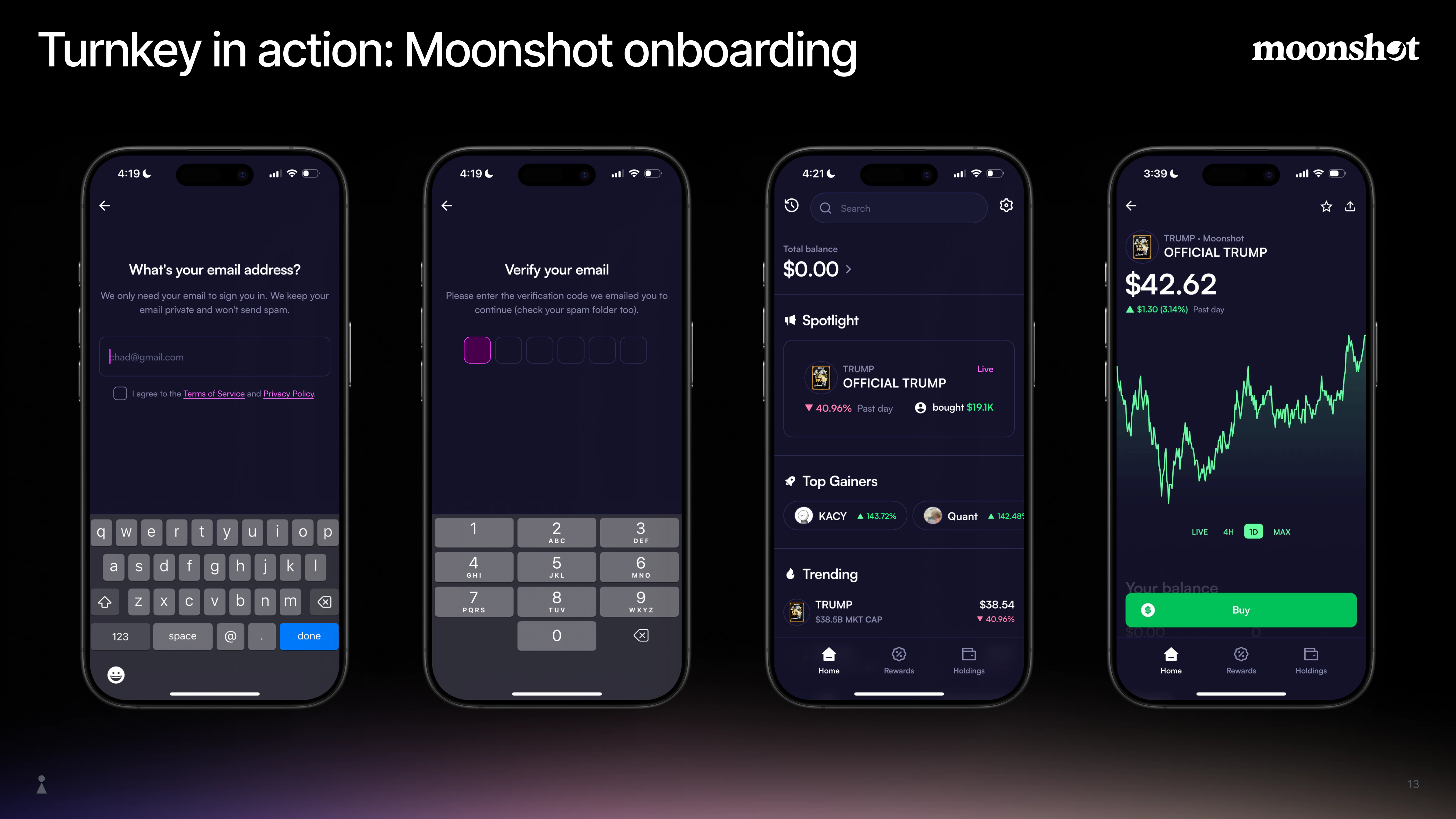
application. Users sign in with familiar methods (passkeys, email, OAuth), without seed phrases,
browser extensions, or external wallets. 0xkey lets you compose your app's core experiences
(onboarding, wallet flows, and transactions) with full control, without restricting critical product
decisions to pre-built flows. Keys stay inside hardware-backed Trusted Execution Environments
[(TEEs)](/security/secure-enclaves), ensuring private keys are never exposed to your developers or
to 0xkey.
You can use the [Embedded Wallet Kit](/reference/embedded-wallet-kit) for fast integration, or
[0xkey SDKs](/api-reference/overview) and the [API](/api-reference/overview) for more customization.
Leading apps use 0xkey for embedded consumer wallets in production — see [Customers](https://0xkey.io/customers).
## Key implementation decisions
0xkey enables developers to tailor non-custodial, embedded user wallets across dimensions such as
custody model, authentication, and more. See the key implementation decisions below to curate the
exact user experience you need. For a full map of embedded wallet capabilities, see the
[Features overview](/embedded-wallets/features/overview).
| Decision | Explanation | Learn more |
| :------------------------- | :--------------------------------------------------------------------------------------------------------------------------------------------------------------------------------------------------- | :----------------------------------------------------------------------------------------------------------------------------------------------------------- |
| **Custody model** | Determine the appropriate custody model for your app. Options include user-controlled, app-controlled, or delegated/hybrid. Configure via policies and sub-organization settings. | [Delegated Access](/concepts/policies/delegated-access-frontend), [Sub-organizations](/concepts/sub-organizations) |
| **Authentication methods** | Choose user auth methods: Passkeys, OAuth/email, or SMS. You can use the [Auth Proxy](/reference/auth-proxy) for backend-signed OTP/OAuth/signup without your own backend, or wire auth to your app. | [Authentication Overview](/authentication/overview), [Auth Proxy](/reference/auth-proxy) |
| **Session management** | Allow a user to take multiple, contiguous actions in a defined period of time. Actions include: Read-write or read-only. | [Sessions](/authentication/sessions) |
| **Wallet architecture** | Choose between key-based (HD) or smart contract wallets for your users. 0xkey supports both. | [Wallets Concept](/concepts/wallets), [Transaction Management](/concepts/transaction-management) |
| **Gas sponsorship** | Integrate a gasless UX via sponsored transactions to cover who pays gas and how transactions are broadcast. | [Transaction Management](/concepts/transaction-management), [Sending sponsored transactions](/embedded-wallets/code-examples/sending-sponsored-transactions) |
| **Key portability** | Determine whether users can import or export keys. | [Import wallets](/wallets/import-wallets), [Export wallets](/wallets/export-wallets) |
### Custody model
Choose how much control users and your app have over signing:
| Model | Description | Why choose this? |
| :--------------------- | :----------------------------------------------------------------------- | :------------------------------------------------------------------------------------------------------------------------------------------------------- |
| **User-controlled** | Only the user can authorize actions (self-custody). | **Full Sovereignty**: Best for non-custodial apps where users require exclusive signing authority via their own authenticators (e.g., passkeys). |
| **App-controlled** | Your backend can authorize actions (automation, trading, subscriptions). | **Seamless Automation:** Ideal for custodial products like trading bots or subscriptions that require acting on a user's behalf without manual approval. |
| **Delegated / hybrid** | Scoped permissions shared between user and backend. | **Frictionless UX:** Enables background actions (e.g., gas sponsorship or scheduled ops) while keeping the user in final control of asset transfers. |
Configure via [policies](/concepts/policies/quickstart)
and [sub-organization settings](/concepts/sub-organizations). See
[Delegated Access](/concepts/policies/delegated-access-frontend) for non-custodial, hybrid, and
app-controlled options.
### Authentication
Balance security and friction for your audience:
* **Passkeys:** Phishing-resistant, biometric. See
[passkey authentication](/authentication/overview).
* **OAuth / email:** Familiar, low-friction. See
[Authentication Overview](/authentication/overview).
* **SMS:** Market-dependent; consider risk and compliance.
0xkey authentication plugs into your onboarding flow. You can use the
[Auth Proxy](/reference/auth-proxy) when you want backend-signed OTP/OAuth/signup with origin
enforcement and central config without hosting your own backend; your frontend calls Auth Proxy
endpoints directly. Alternatively, wire auth to your app. Get started with the
[Embedded Wallet Kit](/reference/embedded-wallet-kit).
### Session management
Choose how users stay authorized and where session credentials live:
* **Read-write vs read-only:** Read-write sessions (OTP, OAuth, passkey sessions) let users perform
multiple signed actions in a time window. Read-only sessions suit low-touch apps where you mainly
need to read data (e.g., via parent-org access or a read-only session token).
* **Storage:** IndexedDB (web) for persistent, client-held sessions without exposing keys to your
JavaScript; SecureStorage (mobile); or LocalStorage (keys in app-accessible storage).
* **Session duration:** Default: 15 minutes (configurable via `expirationSeconds`).
See [Sessions](/authentication/sessions) for mechanisms, refresh, and FAQ, and the
[Embedded wallet quickstart](/getting-started/embedded-wallet-quickstart) for configuration.
### Wallet architecture
Choose where keys are generated and how wallets interact with the blockchain.
| Approach | Pros | Considerations |
| :------------------------- | :----------------------------------------------------------- | :----------------------------------------------- |
| **Key-based (HD wallets)** | Chain-agnostic, no on-chain deployment, broad compatibility. | Standard derivation and signing. |
| **Smart contract wallets** | Gas sponsorship, batching, advanced permissions. | Requires on-chain deployment and infrastructure. |
0xkey supports both. See [Wallets Concept](/concepts/wallets) and
[Transaction Management](/concepts/transaction-management) for derivation and gas sponsorship.
### Gas sponsorship
Provide gasless UX by sponsoring gas for your users. 0xkey supports sponsored transactions and
relay integration so users can sign and send without holding native tokens.
See [Transaction Management](/concepts/transaction-management) for gas sponsorship, transaction
construction, broadcast, nonce management and monitoring capabilities.
### Key portability
Enable key portability and define whether users can import or export private keys. Enabling export
can support user sovereignty and long-term trust. See
[Import wallets](/wallets/import-wallets) and [export wallets](/wallets/export-wallets).
## Core security principles
Embedded consumer wallet with 0xkey is built on these key principles:
* **Keys never leave the enclave:** Private keys live in
[Trusted Execution Environments (TEEs)](/security/secure-enclaves). All derivation and signing
happen inside verifiable infrastructure; only signatures are returned.
[Remote attestation](https://0xkey.io/architecture) lets you verify enclave
integrity. Raw keys are never exposed to your app or to 0xkey.
* **Authenticator-bound requests:** Every sensitive operation is signed by a user-held authenticator
(passkey, email, etc.). The enclave verifies the signature and then performs the operation. No
request, no signing; a compromise outside the enclave cannot move funds. See
[Authentication Overview](/authentication/overview) for supported methods and
[Enclave to end-user secure channel](/security/enclave-secure-channels) for how requests are
verified.
* **Scoped, programmable control:** Choose non-custodial, hybrid, or app-controlled custody.
[Policies](/concepts/policies/quickstart) and sub-organization isolation limit who can sign what.
* **Trusted vs. untrusted separation:** Verification and execution run only inside secure enclaves.
Trusted and untrusted infrastructure are strictly separated so that a breach of your app or
backend does not expose keys or signing capability.
## Architecture at a glance
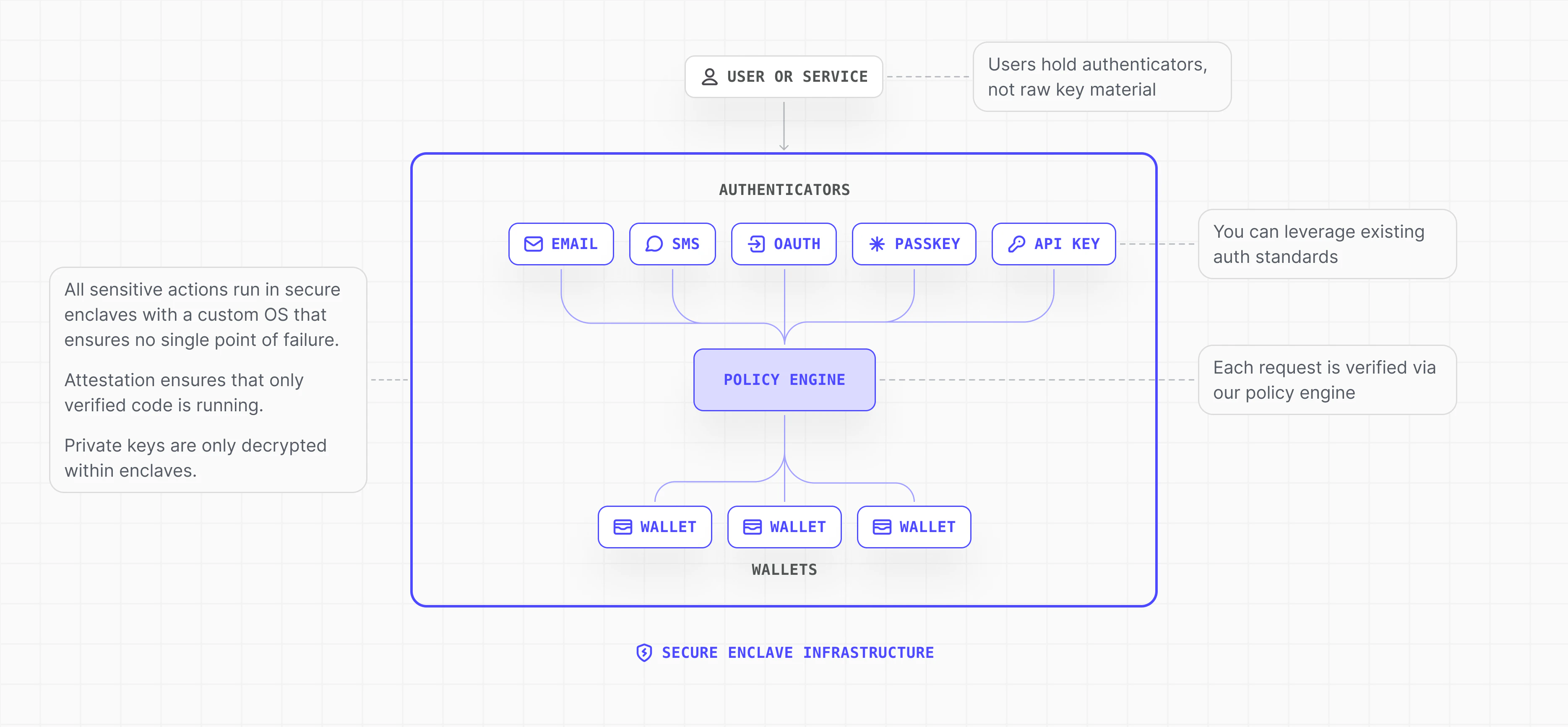
User authentication flows into a signed request to 0xkey. Inside the enclave, the
[policy engine](/concepts/policies/overview) evaluates the request; key derivation and signing
follow, and only the signature is returned. Your app can then broadcast the transaction through
another provider or with
[0xkey Transaction Management](https://docs.0xkey.io/concepts/transaction-management#construction-and-broadcast).
For data flow and infrastructure details, see
[Embedded Wallets overview](/embedded-wallets/overview) and
[Secure enclaves](/security/secure-enclaves).
 ## Example: Neobank-style embedded consumer wallet
Typical requirements and how 0xkey addresses them:
| Requirement | 0xkey capability |
| :-------------------------------- | :-------------------------------------------------------------------------------------------------------------------------------------------------------------- |
| Seamless onboarding | Automated provisioning via [Quickstart](/getting-started/quickstart) and the [API reference](/api-reference/overview) |
| User custody without key exposure | Keys remain in [secure enclaves](/security/secure-enclaves); only signatures are returned |
| Gasless UX | [Sponsored transactions](/concepts/transaction-management) and [sending sponsored transactions](/embedded-wallets/code-examples/sending-sponsored-transactions) |
| Email-based auth and recovery | [Sub-organization recovery](/embedded-wallets/sub-organization-recovery) |
| Send without wallet setup | [Claim links](/wallets/claim-links#claim-links): send via URL; recipient claims with email |
| Backend automation | [Delegated access](/concepts/policies/delegated-access-backend) and scoped signing policies |
| Multichain support | Chain-agnostic derivation and signing; [Networks](/networks/overview) and [Wallets Concept](/concepts/wallets) |
| Fast integration | [Code examples](/category/code-examples) and the [API reference](/api-reference/overview) |
## Setting up your embedded consumer wallet
Follow these steps to launch an embedded consumer wallet experience inside your app.
Create an organization in the [0xkey Dashboard](https://app.0xkey.io) and choose how end users authenticate (Email OTP, Passkeys, OAuth).
**Docs**
* [Account setup (create org)](https://docs.0xkey.io/getting-started/quickstart)
* [Auth Proxy overview](https://docs.0xkey.io/reference/auth-proxy)
* [Email authentication (OTP)](https://docs.0xkey.io/authentication/email)
* [Passkeys integration](https://docs.0xkey.io/authentication/passkeys/integration)
Install and initialize the 0xkey SDK at app startup so sessions and wallet operations are ready immediately.
**Docs**
* [Embedded Wallet Kit](/reference/embedded-wallet-kit)
* [React Native wallet kit (GitHub)](https://github.com/0xkey-io/sdk-js/tree/main/packages/react-native-wallet-kit)
Build your login/signup flow and gate wallet actions until:
* The user is authenticated
* The 0xkey client is initialized
**Docs**
* [Wallet authentication](/embedded-wallets/code-examples/wallet-auth)
* [OAuth and social logins](/authentication/social-logins)
**On first login:**
1. Create a sub-organization
2. Create a wallet
3. Create required accounts (e.g., Ethereum, Solana)
**Docs**
* [Sub-organizations](/concepts/sub-organizations)
* [Create sub-organization (passkey)](/embedded-wallets/code-examples/create-sub-org-passkey)
* [Embedded Wallet Kit](/reference/embedded-wallet-kit)
Expose wallet functionality directly inside your app.
**Signing Docs**
* [Signing transactions](/embedded-wallets/code-examples/signing-transactions)
* [API reference](/api-reference/overview)
* [Sign & send transaction](/embedded-wallets/code-examples/sending-sponsored-transactions)
**Import / Export / Recovery (Optional) Docs**
* [Import & Export wallets](https://docs.0xkey.io/wallets/export-wallets)
## Next steps
Ready to build? You can start with the
[Embedded Wallets Quickstart](/getting-started/embedded-wallet-quickstart), explore the
[Features overview](/embedded-wallets/features/overview), or browse the
[Code Examples Hub](/category/code-examples).
## Example: Neobank-style embedded consumer wallet
Typical requirements and how 0xkey addresses them:
| Requirement | 0xkey capability |
| :-------------------------------- | :-------------------------------------------------------------------------------------------------------------------------------------------------------------- |
| Seamless onboarding | Automated provisioning via [Quickstart](/getting-started/quickstart) and the [API reference](/api-reference/overview) |
| User custody without key exposure | Keys remain in [secure enclaves](/security/secure-enclaves); only signatures are returned |
| Gasless UX | [Sponsored transactions](/concepts/transaction-management) and [sending sponsored transactions](/embedded-wallets/code-examples/sending-sponsored-transactions) |
| Email-based auth and recovery | [Sub-organization recovery](/embedded-wallets/sub-organization-recovery) |
| Send without wallet setup | [Claim links](/wallets/claim-links#claim-links): send via URL; recipient claims with email |
| Backend automation | [Delegated access](/concepts/policies/delegated-access-backend) and scoped signing policies |
| Multichain support | Chain-agnostic derivation and signing; [Networks](/networks/overview) and [Wallets Concept](/concepts/wallets) |
| Fast integration | [Code examples](/category/code-examples) and the [API reference](/api-reference/overview) |
## Setting up your embedded consumer wallet
Follow these steps to launch an embedded consumer wallet experience inside your app.
Create an organization in the [0xkey Dashboard](https://app.0xkey.io) and choose how end users authenticate (Email OTP, Passkeys, OAuth).
**Docs**
* [Account setup (create org)](https://docs.0xkey.io/getting-started/quickstart)
* [Auth Proxy overview](https://docs.0xkey.io/reference/auth-proxy)
* [Email authentication (OTP)](https://docs.0xkey.io/authentication/email)
* [Passkeys integration](https://docs.0xkey.io/authentication/passkeys/integration)
Install and initialize the 0xkey SDK at app startup so sessions and wallet operations are ready immediately.
**Docs**
* [Embedded Wallet Kit](/reference/embedded-wallet-kit)
* [React Native wallet kit (GitHub)](https://github.com/0xkey-io/sdk-js/tree/main/packages/react-native-wallet-kit)
Build your login/signup flow and gate wallet actions until:
* The user is authenticated
* The 0xkey client is initialized
**Docs**
* [Wallet authentication](/embedded-wallets/code-examples/wallet-auth)
* [OAuth and social logins](/authentication/social-logins)
**On first login:**
1. Create a sub-organization
2. Create a wallet
3. Create required accounts (e.g., Ethereum, Solana)
**Docs**
* [Sub-organizations](/concepts/sub-organizations)
* [Create sub-organization (passkey)](/embedded-wallets/code-examples/create-sub-org-passkey)
* [Embedded Wallet Kit](/reference/embedded-wallet-kit)
Expose wallet functionality directly inside your app.
**Signing Docs**
* [Signing transactions](/embedded-wallets/code-examples/signing-transactions)
* [API reference](/api-reference/overview)
* [Sign & send transaction](/embedded-wallets/code-examples/sending-sponsored-transactions)
**Import / Export / Recovery (Optional) Docs**
* [Import & Export wallets](https://docs.0xkey.io/wallets/export-wallets)
## Next steps
Ready to build? You can start with the
[Embedded Wallets Quickstart](/getting-started/embedded-wallet-quickstart), explore the
[Features overview](/embedded-wallets/features/overview), or browse the
[Code Examples Hub](/category/code-examples).